
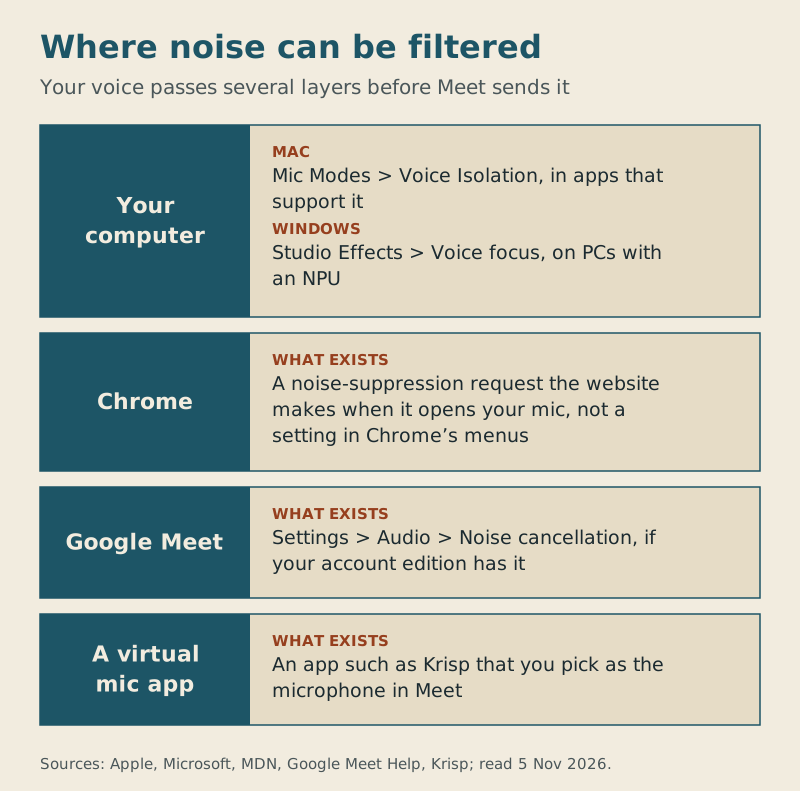
There is no noise suppression switch in Chrome itself. When people search for Chrome noise suppression on Google Meet, they usually mean one of three other things: Meet's own Noise cancellation toggle under Settings > Audio, a request Meet makes to the browser when it opens your microphone, or a filter in your computer's operating system. Meet's toggle is the one to check first, but Google ties it to your account edition, so it isn't there for everyone. Whichever you use, run one strong filter at a time.
How we checked this
Sources read 3 November 2026 and re-read on 5 November 2026: Google Meet Help on noise cancellation, Chrome Help on microphones, MDN's reference for the browser's noiseSuppression setting, Apple's Mic Modes guide, Microsoft's Windows Studio Effects page and Krisp's noise cancellation page. The noise-cancellation screenshot is our own capture of Google's public help article. No noise levels were measured for this piece. How we work: About AllHands Audio.
Is there noise suppression in Chrome?
Not as a setting you control. Chrome's camera and microphone help covers which sites may use your mic and which mic is the default; it doesn't describe a noise filter. What does exist is lower down: when a site such as Meet opens your microphone, it can ask the browser for noise suppression. MDN's noiseSuppression reference explains that the browser then tries to deliver it, but won't fail if it can't, and that the feature is often provided by the microphone itself. MDN also marks it as having limited availability across browsers.
So the honest answer to "how do I turn on Chrome noise suppression" is: you don't. The website decides what to ask for, and in Meet's case the setting you actually see is Meet's own.
Meet's noise cancellation: the toggle most people mean
Google calls it noise cancellation, and most people search for suppression; they are the same control. Our noise cancellation vs suppression explainer covers the naming. To switch it on, per Google's help page:
- Before a meeting: on meet.google.com select the meeting, click More options > Settings > Audio, turn on Noise cancellation, then Join now.
- In a meeting: click More options > Settings > Audio and turn on Noise cancellation.
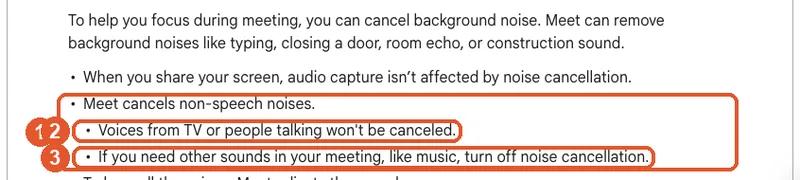
Google is specific about what it removes and what it leaves. It cancels non-speech noise such as typing, a closing door, room echo or construction, but voices from a TV or people talking are not cancelled. If you need other sounds in the meeting, such as music, Google says to turn it off. Audio you share with your screen isn't affected.
Why the toggle is missing
Cloud-based noise cancellation on a computer depends on your Google account. Google lists Business Starter, Standard and Plus, Enterprise Essentials, Standard and Plus, Frontline, Workspace Individual and Google One members on a plan of 2 TB and up as on by default; the Education editions and Teaching and Learning Upgrade have it off by default; and anyone on Google Workspace with Gemini gets Studio sound in its place. Our step-by-step guide to turning it on has the screens.
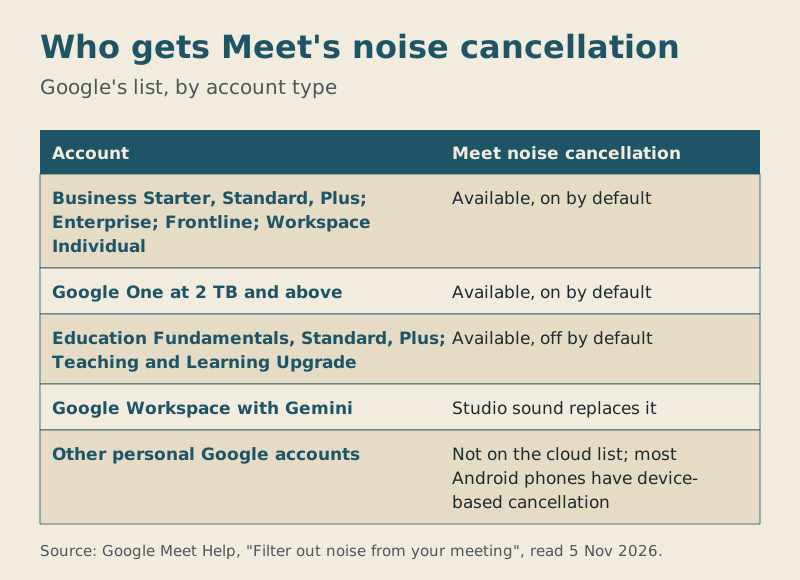
A personal Google account without a 2 TB Google One plan isn't on that cloud list. On most Android phones Google says device-based noise cancellation is available to everyone, but on a laptop you'll need one of the options below.
Filters below the browser: your Mac or Windows PC
If Meet's toggle isn't on your account, the operating system may have its own filter, which works before the audio reaches Chrome.
- Mac: Apple's Mic Modes guide describes Voice Isolation to filter out background sounds, Wide Spectrum to keep them, and Standard. Apple's steps begin inside an app that offers Mic Modes (FaceTime is its example) and note that options vary by app, so check whether Mic Mode appears while Meet is open in your browser.
- Windows: Microsoft's Windows Studio Effects page lists Voice focus, which isolates your voice and reduces background noise. It needs a PC with a neural processing unit (NPU); if Studio Effects don't show in Quick Settings or under Bluetooth & devices > Cameras, Microsoft says the PC might not have one.
Extensions and virtual microphones
Before installing a Chrome extension for noise, check what it actually changes. The test is simple: with the extension on, open Settings > Audio in Meet and watch the mic bar while the fan or keyboard runs. If nothing changes in what Meet picks up, the extension isn't filtering what you send.
A virtual microphone app is the other route. Krisp, for example, installs on Mac or Windows and, per its noise cancellation page, you then choose Krisp Microphone wherever your meeting app asks for an input device. In Meet that's Settings > Audio > Microphone. It works whatever your Google account, and the same mic carries over to Webex; our Krisp with Meet and Webex guide shows both. Krisp has no free plan: you get seven days free with no card, and after that Krisp needs a paid plan.
Don't stack: pick one
Each of these layers is built to work on its own. If you turn on Meet's noise cancellation, a Mac's Voice Isolation and a virtual mic at the same time, it's hard to tell which one helps and which one makes your voice sound clipped. Use one at a time and ask a colleague how you sound, starting with the cheapest that exists for you: Meet's toggle if your account has it, then your computer's own filter, then an app. If the mic doesn't work at all, that's a different problem: start with Google Meet mic not working.
Frequently asked questions
Can I switch on noise suppression in Chrome for Google Meet?
Chrome has no switch for it. Turn on Meet's Noise cancellation under More options > Settings > Audio, if your account has it.
Is Google Meet noise cancellation free?
It comes with certain Google Workspace editions and with Google One storage plans from 2 TB upward. Other personal accounts aren't on Google's cloud list for computers.
Does Meet's noise cancellation remove other people's voices?
No. Google says it goes after non-speech sounds; a TV or people chatting nearby stay audible.
Should I use a Chrome extension for noise cancellation?
Only if Meet's mic bar shows it changes what Meet picks up. Otherwise use Meet's toggle, your computer's mic filter or a virtual microphone app.